
S Y
Omni.
Public transit made easy
"It's much more than just getting from point A to point B!"

Roles
-
UX researcher
-
UX|UI designer
Responsibilities
-
User research
-
Wireframing
-
Prototyping
-
Usability testing
Time constraint
-
3 weeks
What
-
Mobile app (iOS)
I created this app to improve the city's public transportation system. This app allows bus-riders to navigate the bus system with confidence and ease. Bus-riders need to know when their bus is arriving, what bus they need to get on, and they need to know how much time they have until their bus arrives. Omni. does just that.
What's the problem?

Transit officials have identified a problem that they want to solve. Due to expansion, numerous bus routes have been recently added. Many of those routes stop at the same bus stop. Riders want to know when the next bus will arrive at each stop. They also want to know how much time they have to get to the bus stop.
Before the new routes were added, riders could simply rush to the stop when they saw a bus coming—but that doesn't work anymore because it might not be the bus that they're expecting. The city has developed a way to know how far away each bus is from a stop, but they aren't sure how to share that information with riders.
Riders are currently complaining the most about the bus stop at Washington and State, which is served by seven bus lines.

Here's the solution
We designed the app to allow access to:
-
Current arrival times
-
Schedules for each bus line
-
Future arrival times
-
Travel time to each bus stop
-
Real time updates on bus schedules, including any delays
The Design Process

For my design process, I utilize the Double Diamond Design model. This design model follows the stages: Discover, Define, Develop, Deliver. Using this process allows me to fully understand the problem and come up with creative solutions.
Discover
To kick off the Discover phase, I completed a SWOT analysis on two popular transit apps: Google Maps and City Mapper.


User Surveys
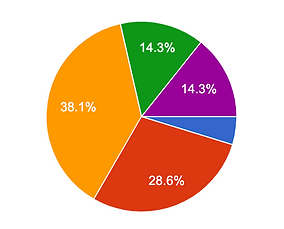
For my user research, I created a survey and deployed it for 48 hours. I received 36 responses giving me important information needed to make an app that meets the user's needs.
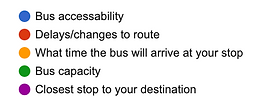
What is the MOST important information to you?
How often is the bus late?


Define
Now that we have discovered who the user is and their needs, it's time to put that information to use and define the project.
To kick off the Define phase, we start with our user stories.

User Flow
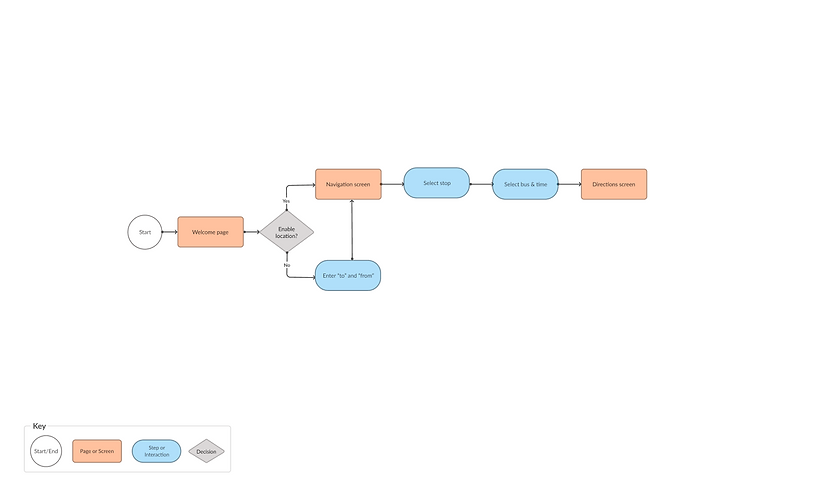
With the needs outlined in the user stories, I created a user flow that meets the needs while being simple to use.
Wireframe Sketches


With the user flow created, we can now move onto sketching out the lo-fi wireframes.
Lo-fi Wireframes

Using Figma, I created Lo-fi wireframes. Doing this allowed me to visualize my app without getting too caught up on the visual details, such as color, just yet.
Develop
Now that we have the skeleton finished, it's time to move onto the develop phase. This is where we bring to life everything we have worked on.
I began to work on the UI aspect of the project and created a high fidelity prototype.

Usability Testing & Iterations
Once I developed the lo-fi prototype, I had 6 participants test it out and give feedback. While all 6 participants were able to complete the goal of finding the Washington & State stop, they did have some feedback on improvements.
The participants suggested adding the travel time the user will spend on the bus. They all suggested adding an indicator letting the user know if there is available seats on the bus.

