
S Y
AllTogether
An app to track your therapy progress and daily mental health

Overview
Roles
-
UX researcher
-
UX|UI designer
Responsibilities
-
User research
-
Wireframing
-
Prototyping
-
Usability testing
Time constraint
-
2 weeks
What Requirements
-
Mobile app (iOS)
What's the problem?

An issue that many parents and caregivers experience is not having a way to organize their family's important information in one easily accessible place. Parents and caregivers have a lot of obstacles to navigate in order to keep their family on track. Responsibilities such as school, doctor appointments, and events can become overwhelming.
In response to this problem, I created the app “All together”. All Together is an app that organizes a family's important information in one secure location. For this project, I worked with a busy working mom to give me the crucial insight I needed to come up with a solution.
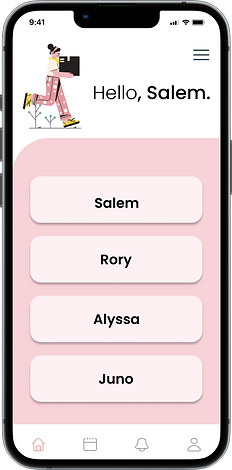
Here's the solution
My solution to this problem is to create an app that:
-
Organizes the family’s schedule and personal information
-
Is protected and secure
-
Can be shared with other people
The Design Process

For my design process, I utilize the Double Diamond Design model. This design model follows the stages: Discover, Define, Develop, Deliver. Using this process allows me to fully understand the problem and come up with creative solutions.
Discover
To kick off the Discover phase, I completed SWOT analysis' on two family apps.


User Research
To conduct my user research, I utilized Google forms to create a survey for parents and caregivers. I received 32 responses in 72 hours. Some important takeaways from the survey results were:
-
72% reported feeling overwhelmed with the responsibilities and information they need to keep track of.
-
83% reported they are a working parent and receive help from other family members or nanny’s.
-
79% reported feeling disorganized with their child(ren)’s medical info and/or appointments.
-
When asked if they currently use an organization app, 88% responded yes.
-
Of those participants, only 22% responded that they were satisfied with their current app.
-
56% reported that other people aside from the primary parent has taken their child(ren) to an appointment or important event.
User Persona

Define
Now that we have discovered who the user is and their needs, it's time to put that information to use and define the project.
To kick off the Define phase, we start with our user stories.
-
As a parent, I want to have all of my family’s events, appointments, and information in one place.
-
As a caregiver, I want to have all the information I need when bringing kids to appointments.
-
As a working parent, I want to be able to be up to date on my family’s daily lives and activities.
Sketches


Develop
Now that we have the skeleton finished, it's time to move onto the develop phase. This is where we bring to life everything we have worked on.
I began to work on the UI aspect of the project and created a high fidelity prototype.

Usability Testing & Iterations
With my research I was able to create a prototype and conduct usability testing with 7 participants. Each participant was able to successfully navigate the prototype and I received valuable feedback outlined below.
Strengths
-
User friendly
-
Secure with face ID
-
Organized well
-
Not overwhelmed with too much info
Weaknesses
-
Needs a universal calendar button
-
Lacks login for non-parent
With the usability testing feedback I was able to see some areas that needed change. I added a calendar button at the bottom navigation bar where everyone’s calendars are together.


Before

After

Guest pin

Guest home

For the next change I made I added an option to the login screen for a guest to input a pin in order for them to login and use the app. In my original thought process I intended for a non-parent to use the login of the parent, but after feedback during user testing it was suggested that a parent may not want to share their password. Having the option to input a pin created by the parent allows someone to access the information they need without having to use the parents login. This is a great solution for someone such as a babysitter or nanny that is taking the child to a doctor appointment and may need to access the child's information.
Final Thoughts
All Together is a great solution to the frustrations that parents and caregivers often face. Being able to have everything in one easy to use, secured app is something every parent should be able to have access to.
For further development of All Together, I would like to create a second app for medical professionals so they can add information as well as access the information they might need to know about the child or parent.